
How Much Overlap Do Screenshots Need to Stitch Correctly?
The single biggest factor in a clean stitched screenshot is how much you overlap each shot. Here's the rule, why it works, and how to do it fast.
Short answer: at least two clear lines of text, or one complete message with distinctive content. This is a starting point, not a guarantee. Very short or repetitive content needs more.
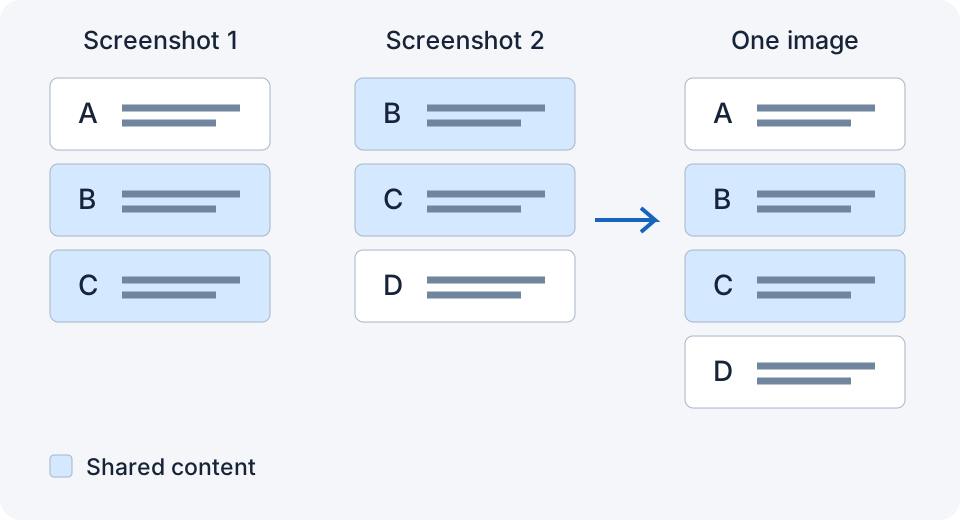
Why overlap matters
A stitching app aligns two screenshots by finding a region that appears in both. That region needs to be distinctive: a line of text, a message bubble, an image edge. A few pixels of a solid background, or half a row of identical icons, doesn't give it anything to match. When the match is weak the app either guesses (and you get a seam) or gives up (and asks you to pick manually).
The rule by content type
| Content | Practical starting point |
|---|---|
| Chat messages | One complete message |
| Article text | At least two clear lines; more if short or repetitive |
| Comment threads | One complete comment |
| Tables or lists | One full row with text in it |
| Mostly images | A distinctive area inside the image, not just a plain edge |
How to do it fast
Instead of measuring, use a landmark: before you scroll, notice the last message or line on screen. Scroll until that landmark is near the top. Screenshot. Repeat. It takes about a second per shot once it's a habit.
Too much overlap?
More overlap can help, but nearly identical screenshots or repeated rows can make matching ambiguous. About a quarter to half a screen is a useful starting point, not a fixed limit.
When overlap isn't the issue
If you left plenty of overlap and still got a seam, it's one of: the layout changed between shots (new message, image loaded), the view changed (zoom, rotation, keyboard), or the app matched the wrong repeated region. See How to Fix Ghosting and Misaligned Seams in Stitched Screenshots for those.
A note on LongShot
I built LongShot to verify overlap before it stitches, precisely so this rule is forgiving: if the match is solid it merges, and if it isn't it asks you to review or select the screenshots in the app. It does not always identify the exact pair to retake. Check your app's own overlap guidance too.
Related
- How to Fix Ghosting and Misaligned Seams in Stitched Screenshots
- How to Take a Long Screenshot of a Text Conversation on iPhone
- How to Screenshot an Entire Instagram or TikTok Comment Thread on iPhone
Something not working? Email me: longshotapp@163.com
LongShot for iPhone
Combine overlapping screenshots into one long image.