Best Free Scrolling Screenshot Apps for iPhone (2026)
Choose a long screenshot app for iPhone by workflow, free limits, watermarks, and privacy. Compare Tailor, Picsew, Stitch It, and LongShot.
"Free" means different things in this category: free with ads, free with a watermark, free up to N images, or free for a monthly quota. Here's what each app's free tier actually gives you.
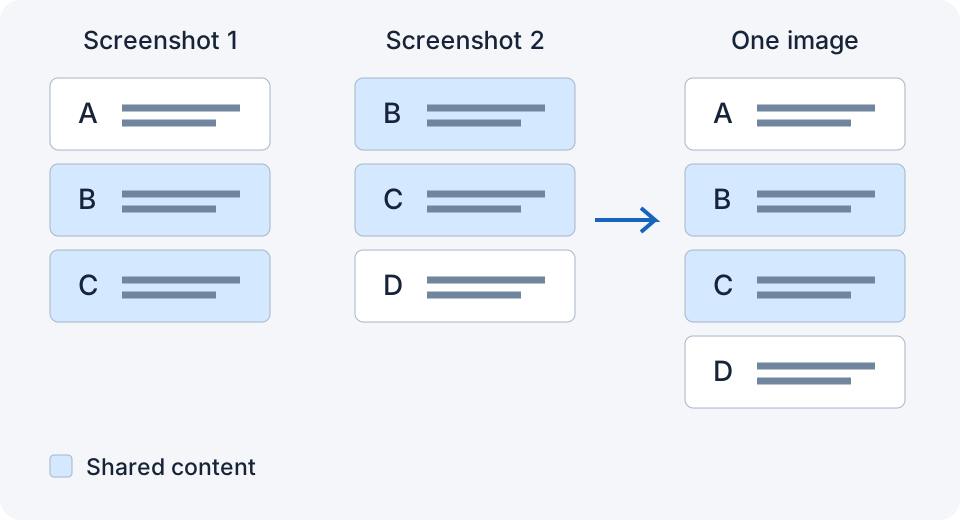
Start with the screenshot you need
| What you want to keep | Where to start | What to check |
|---|---|---|
| One Safari webpage | Try Full Page before installing anything | Can you save the full page in the format you need? |
| Overlapping chat screenshots | Tailor or LongShot | Does a short trial keep every message once? |
| Manual join correction and editing | Picsew | Is your required feature in the free or paid tier? |
| A conversation with private details | Stitch It, or another editor with redaction | Open the exported image and check that every private detail is covered. |
For the capture steps, start with how to take a long screenshot on iPhone. This comparison uses the linked store listings and developer documentation, not a same-device performance benchmark. I develop LongShot; the other apps may suit a different workflow better.
1. Tailor
Free. Opens, finds your screenshots, stitches automatically. Vertical only. Its release notes say third-party ads were removed; the US store still lists a $2.99 “Remove Ads” purchase and tips. A current free-tier watermark or image-count limit is not clearly stated. Best if you want little setup.
2. Picsew
Free download with a basic tier; Plus is $0.99 and Pro $1.99 in the US store. Advanced features require an upgrade; check the in-app tier comparison for the exact features you need. The app offers automatic and manual stitching, scroll capture, annotations, and exports. Best if you want tools and are willing to pay for them.
3. Stitch It
The free tier has a watermark and advertising. Pro removes them and unlocks unlimited images; the current description does not state the free image-count limit, so do not assume the old three-image cap still applies. The US store lists Pro Upgrade $4.99, Pro Lifetime $4.99 and $19.99, Pro Monthly $1.99, and Pro Annual $9.99; availability depends on the offer shown in the app. Strong redaction tools, and it is on Android too. Best if you need to cover private details before sharing.
4. LongShot
LongShot 1.2 is available on the App Store as a free download, with no ads, no watermark, and no account. It checks overlap and saves an original-width PNG on your iPhone. Back Tap needs a compatible version and setup; large or uncertain groups may ask you to open the app. It includes 10 free stitches each calendar month. After that, previews remain available; a one-time US$0.99 purchase in the US App Store unlocks unlimited saving, sharing, and Shortcut exports for life. No subscription; local prices may vary. Best if you want a simple stitching workflow. (I made this one.)
Free tier at a glance
| Ads | Watermark | Free limit | Paid options (US) | |
|---|---|---|---|---|
| Tailor | Third-party ads removed | Not clearly stated | Not stated | “Remove Ads” $2.99 still listed; tips |
| Picsew | Not listed | Not clearly stated | Advanced features gated | Plus $0.99 / Pro $1.99 |
| Stitch It | Yes | Yes | Image count not stated | Monthly $1.99; annual $9.99; lifetime/upgrade listings $4.99–$19.99 |
| LongShot | No | No | 10 free stitches/calendar month; preview after allowance | US$0.99 lifetime unlimited exports; no subscription |
Competitor listings checked September 8, 2026; LongShot 1.2 release and pricing verified September 12, 2026, in the US App Store. Local prices may vary. A listed purchase is not proof that every user can buy that offer. Check the current in-app purchase screen.
How to pick
- Stitch a few times a month, want simplicity: Tailor or LongShot.
- Stitch daily, want tools: Picsew.
- Need to redact: Stitch It.
- Care about privacy: compare the current data labels as well as local image processing.
Try three screenshots before choosing
Use the same three non-private screenshots in each app you try. Include two clear lines of overlap, a visible first and last message, and one image or date divider. Keep the originals unchanged so the inputs are comparable.
Check the exported result, not just its preview:
- Can you read the first and last messages?
- Does each shared message appear once, with no missing line at a join?
- Is the text still legible at full size?
- Does saving add a watermark, ask for payment, or require an account?
- If a join is wrong, can you correct it without starting again?
Record the app version, iOS version, and free or paid tier alongside your result. These are a repeatable selection checklist, not measured scores for the four apps. For a chat-specific walkthrough, see the text-message guide.
Related
- Tailor vs Picsew vs LongShot: Which iPhone Screenshot Stitcher Should You Use?
- How to Take a Scrolling Screenshot on iPhone Without Installing an App
- How Much Overlap Do Screenshots Need to Stitch Correctly?
Sources checked: 1 · 2 · 3 · 4 · 5 · 6 · 7 · 8 · 9
Something not working? Email me: longshotapp@163.com
LongShot for iPhone
Combine overlapping screenshots into one long image.